Refresh LoomaScale in ChatGPT to get new tools
We add tools to LoomaScale most weeks, and ChatGPT will not notice on its own — it keeps the list of tools it read the last time it asked. One button makes it ask again. Here is where that button is.
When you need this
Two situations. We announce a new tool and you want it now. Or ChatGPT tells you it cannot do something you know LoomaScale does — create a Performance Max campaign, say — because that tool did not exist the last time it looked.
The setup, step by step
- 1
Open LoomaScale under Plugins and choose Manage
In ChatGPT, go to Plugins in the left sidebar and click LoomaScale. On its page, press the “…” button next to Try in chat and choose Manage.
Open ChatGPT Plugins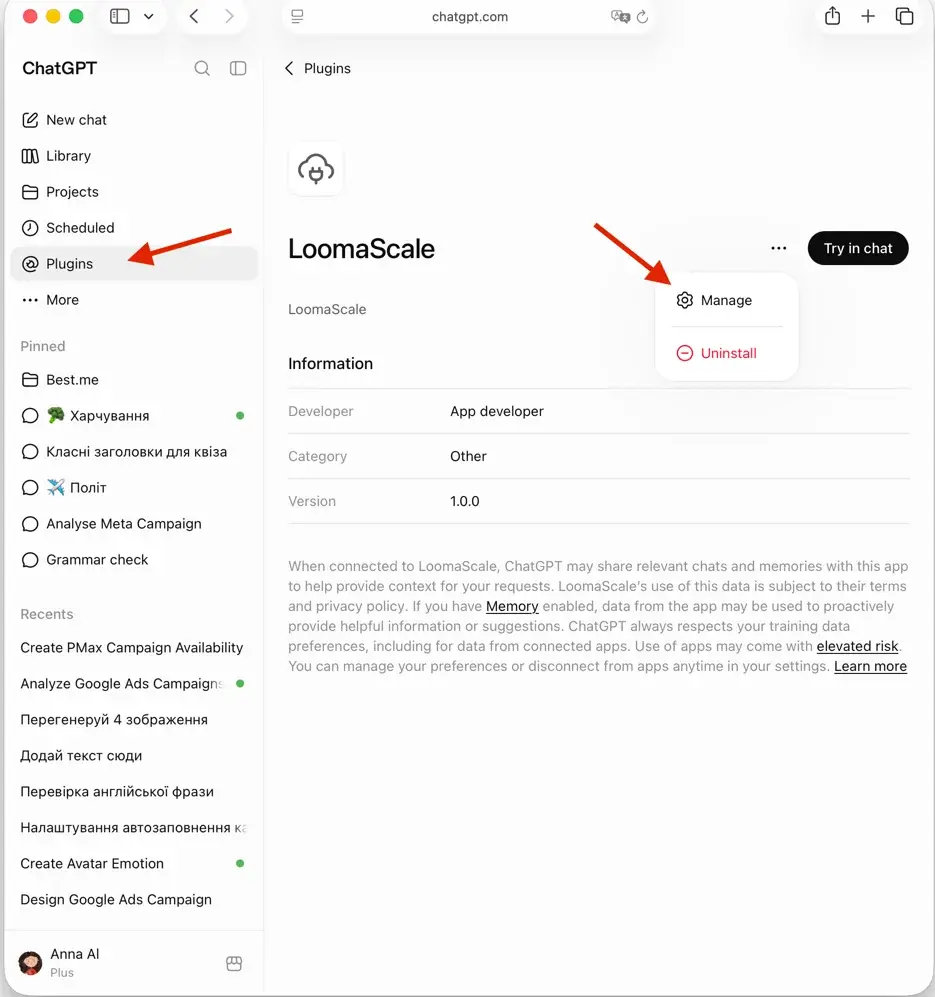
- 2
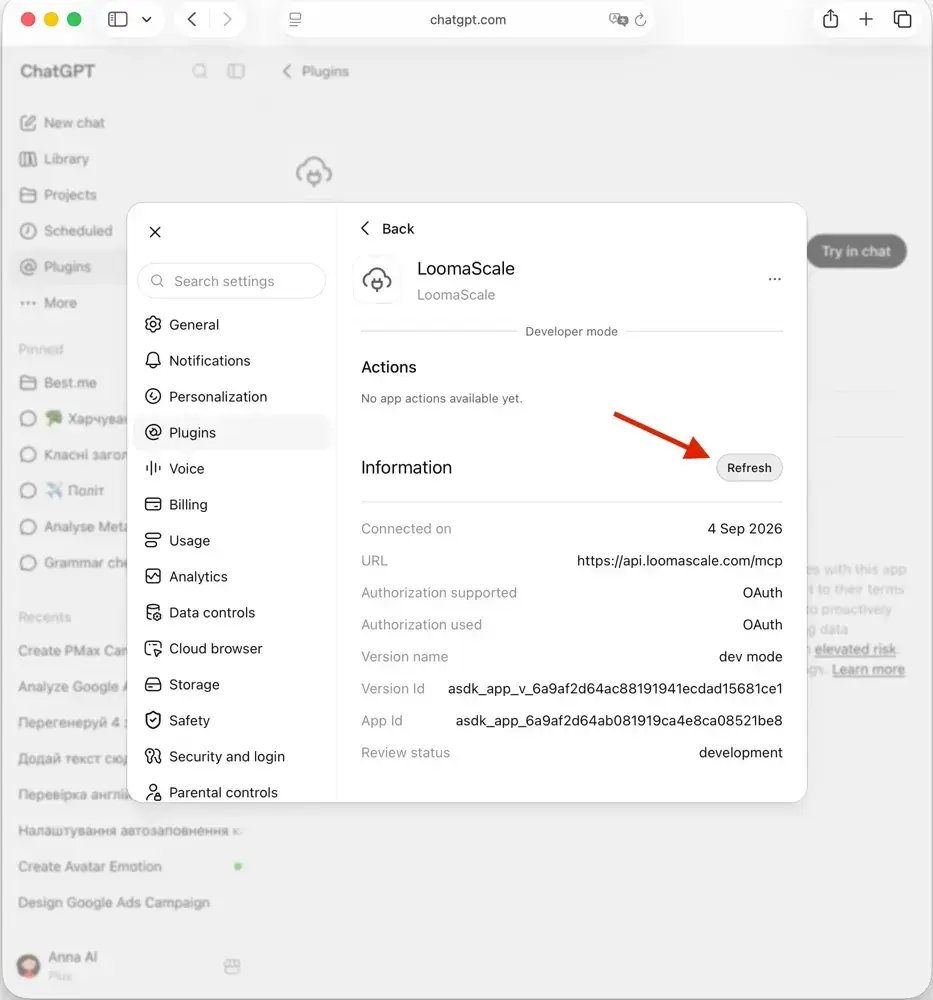
Press Refresh
The settings panel opens on LoomaScale. Scroll down and press Refresh, to the right of Information. ChatGPT re-reads the tool list from the server — it takes a second, and nothing about your connection changes.
Questions people ask before they start
Do I have to sign in again?
No. Refresh only re-reads the list of tools. Your Google Ads permissions are untouched, and you will not see a sign-in screen.
I pressed Refresh and nothing changed.
Start a new chat first — an open one keeps the old list. If the tool is still missing, check that it is switched on under Actions; if it is not there at all, remove the plugin and add it again with the ChatGPT setup guide.
Why does this not happen automatically?
Because ChatGPT decides when to ask, and our server has no way to tell it that something changed. The longer write-up explains the mechanics.
Everything else
Setup guides, what you can ask for once connected, and how the guardrails work.
Back to documentationConnect your assistant to your ad platform
LoomaScale runs inside the assistant you already use. Pick the pair you work with; each guide takes about five minutes.

Manage Google Ads campaigns from ChatGPT: search terms, budgets and new campaigns, paused for your review. One-click install from ChatGPT's directory.
Read the integration
Manage Google Ads from Claude: audits, budget changes and new campaigns, every write inside the spend cap you set. Connect from Claude's directory.
Read the integration
Install the LoomaScale plugin in Claude Code with two commands and audit Google Ads from your terminal: search terms, budgets and pacing, with skills built in.
Read the integration
Install the LoomaScale plugin in OpenAI Codex with two commands and audit Google Ads from your terminal: search terms, budgets and conversion goals.
Read the integration
Manage Facebook and Instagram campaigns from ChatGPT: ad sets, budgets and creatives in one chat. The same one-click install.
Read the integrationManage Facebook and Instagram campaigns from Claude: audits, budget caps and new ad sets, inside the limits you set.
Read the integrationRun Facebook and Instagram campaign reviews from Claude Code: the same plugin, one sign-in, and skills for waste audits, pacing and creative fatigue.
Read the integrationReview Facebook and Instagram campaigns from OpenAI Codex: the same plugin and sign-in, with placement, age and lead-quality checks.
Read the integrationConnect Manus to Google Ads through LoomaScale’s MCP server. Analyze campaigns, keywords and search terms, then request changes within your permissions and spend cap.
Read the integrationAsk Slackbot about Google Ads in any Slack DM: audits, search terms and pacing checks, with changes kept inside your spend cap. Install the app once per workspace.
Read the integrationConnect Manus to Meta Ads through LoomaScale’s MCP server. Review Facebook and Instagram campaigns, ad sets, creatives and placements.
Read the integrationAsk Slackbot about Facebook and Instagram campaigns in any Slack DM: delivery, pacing and ad-set spend, read live from Meta Ads.
Read the integration