
Your MCP server shipped a new tool. ChatGPT does not have it. Nothing is broken: ChatGPT is working from the tool list it read the last time it asked, and nobody has told it to ask again. Open the app under Plugins, press Refresh, start a new chat.
Why doesn't ChatGPT see the new tool?
Because tool discovery in MCP is a pull, and the client decides when to pull.
When you connect an MCP app, ChatGPT calls tools/list once and keeps what comes back — names, descriptions, input schemas, and the server's own instructions. That snapshot is what the model sees for the rest of the connection's life. Ship a tool an hour later and the snapshot is unchanged.
The protocol does have an answer for this. A server can declare listChanged in its tools capability and then push notifications/tools/list_changed whenever its inventory moves. Plenty of servers do not, and LoomaScale's does not either: our endpoint is stateless, answers 405 to a GET, and holds no event stream, so there is nowhere for a push to go. The list itself is rebuilt on every tools/list call, which means the server is never the stale part — it hands over the current set the moment it is asked. It just cannot volunteer.
That leaves exactly one lever: make the client ask again. In ChatGPT, the lever is a button.
How do I refresh an MCP app in ChatGPT?
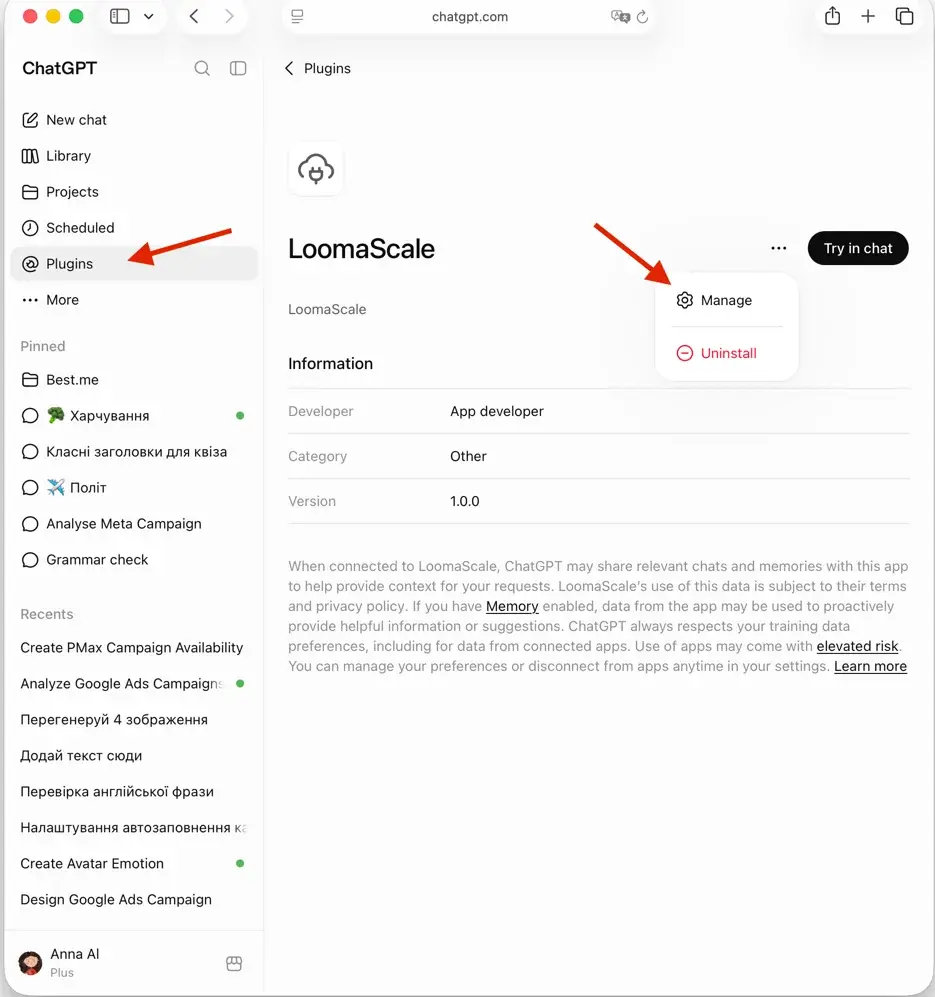
1. Open the app under Plugins and choose Manage. Go to Plugins in ChatGPT's left sidebar and click the app. On its page, press the "…" button next to Try in chat.
2. Press Refresh. It sits to the right of the Information heading in the settings panel. ChatGPT re-reads the tool list, the tool descriptions and the server instructions. Your OAuth grant is not touched — no sign-in screen, no re-authorization.
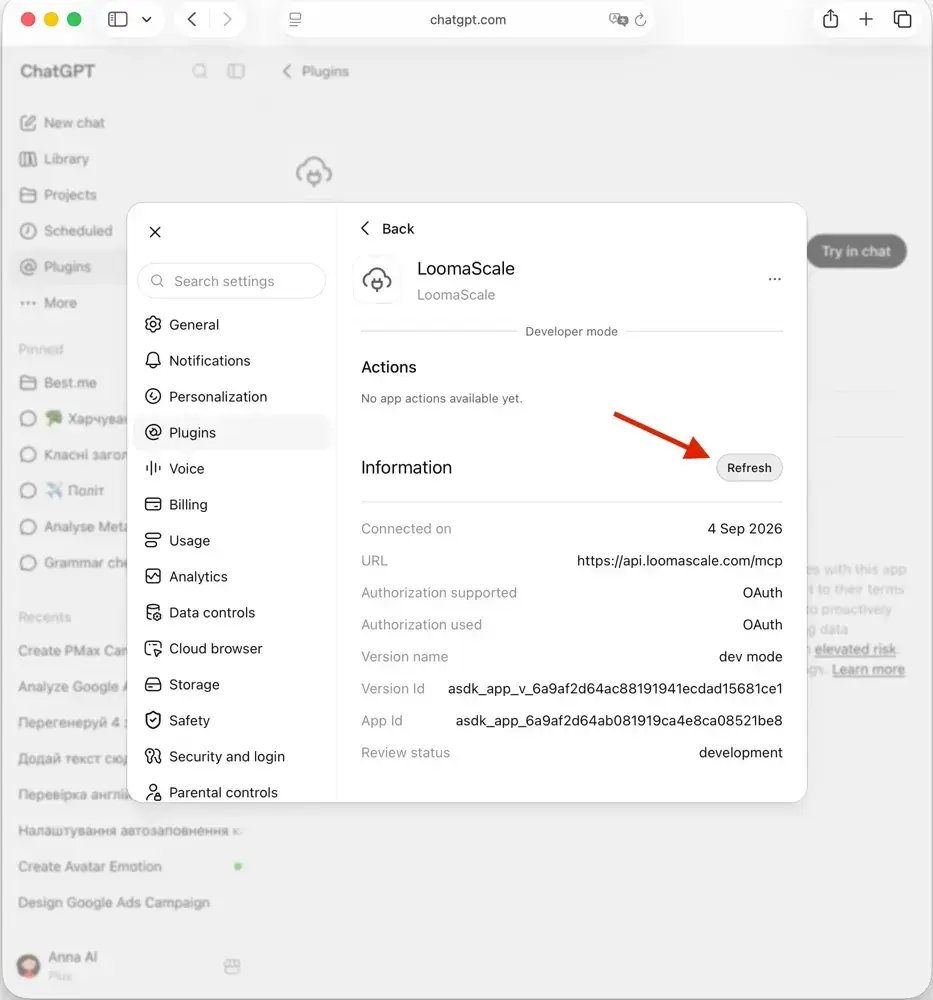
OpenAI documents the same step on the developer side: after changing tool names, descriptions, schemas, annotations or authentication, you deploy the server, open the connection in ChatGPT Plugins, and select Refresh.
3. Start a new chat. This is the step people skip. A conversation that is already open is running against the tool list it started with, so asking again in the same thread gets you the same answer.
If you use LoomaScale and want the version with nothing in it but the clicks, the short guide has it.
Refresh didn't help — what else?
The tool arrived switched off. Refresh pulls new actions in, but a new action is not enabled by default. Check the Actions list on the same panel and turn on the one you want.
"This action needs write access." That is not a stale tool list. The tool is there; your connection was authorized for reading only. Reconnect and grant the write permission — a different operation from Refresh, and the one case where you genuinely will see a sign-in screen again. The setup guide walks through it.
You are on a workspace or enterprise plan. Then the tool list you see was not pulled from the server by you at all — it is a snapshot an admin approved and published. Later changes by the developer do not apply until an admin refreshes the actions in workspace settings and republishes; changes to existing actions arrive as a diff for them to accept, and new ones arrive disabled. Nothing you press in your own settings will move it.
The developer shipped it, but OpenAI has not approved it yet. A published app does not get a new tool the moment it is deployed. OpenAI scans the server daily and checks each new or changed tool on its own; one that fails a check is held while the rest go live, and Refresh cannot pull a tool that is still held. Only the developer can see this, in the plugin dashboard under MCPs and Issues, and only they can fix it. One of ours sat there for three weeks because its description promised one thing and the code did another.
Still nothing. Remove the app and add it again. That forces a fresh handshake and a fresh tools/list from scratch, and it is quicker than working out which cache did not clear. You will have to authorize again — the setup guide is a few clicks.
Does Claude need the same thing?
Not the same button, because we have not found one. Claude's connectors expose no refresh control that we can point you at, and inventing an affordance that may not exist would cost you more time than the honest answer: disconnect LoomaScale and connect it again from its listing in Claude's connector directory. The reconnect is the refresh.
What you might be missing
LoomaScale adds tools every few weeks — for Google Ads, for Meta Ads, and one that reports where your plan or free trial stands. A typical addition is google_query: it runs a read-only report against your connected Google Ads account, so a breakdown the named tools never anticipated now has an answer. The Meta tools are the ones with no search-term or keyword equivalent, because Meta has none; the wedding-photography walkthrough shows what they read instead — placements, age bands, frequency and pacing, and the personal-training walkthrough runs the same set on a weekly cycle.
It is a good illustration of the failure mode, because a stale connection answers wrongly rather than blankly. Ask for cost per conversion split by device and day of week on an old tool list, and ChatGPT will tell you it can show you campaign performance but not break it down that way — which was true last week, and reads exactly like a product limitation rather than a cache.
So when an assistant tells you a connector cannot do something, refresh before you believe it.




