Connect ChatGPT to Meta Ads with LoomaScale
LoomaScale is the connector between your Meta Ads account and ChatGPT. Install it from ChatGPT's plugin directory, sign in, connect your Meta ad account, and ChatGPT can analyze Facebook and Instagram campaigns, find wasted spend and make changes when you ask.
- Listed in ChatGPT's plugin directory
- No code
- No API setup
- Free to try
How to connect ChatGPT to Meta Ads
- Open LoomaScale in ChatGPT's plugin directory.
- Click Install plugin.
- Sign in to LoomaScale, or create a free account.
- Connect your Meta ad account, approve access and set a daily budget cap.
- Ask ChatGPT to list your campaigns.
What you can do with ChatGPT + Meta Ads
Each of these is a sentence you type into ChatGPT. LoomaScale runs it against your live ad account and ChatGPT answers with the numbers.
Audit wasted spend
“Find wasted spend in my Meta Ads during the last 30 days.”
Review campaign performance
“Show my campaigns, spend, results, cost per result and biggest problems.”
Catch creative fatigue
“Which ads have rising frequency and falling CTR? Tell me what to refresh.”
Build campaigns
“Create a conversions campaign for this landing page and leave it paused.”
Manage budgets
“Show ad sets limited by budget and recommend changes.”
How LoomaScale connects ChatGPT to Meta Ads
ChatGPT cannot reach your ad accounts on its own. LoomaScale sits between them: you add it to ChatGPT once, sign in with your LoomaScale account, and from then on ChatGPT can read your Meta ad account — Facebook and Instagram campaigns alike — and act on it when you ask it to.
The whole setup takes about a minute and needs no code. LoomaScale is listed in ChatGPT's plugin directory, so it installs in one click — there is no developer mode to turn on and no server address to paste. Under the hood it is an MCP server with OAuth sign-in, the same standard every plugin in the directory uses.
Nothing spends money by itself. New campaigns, ad sets and ads are created paused, a campaign LoomaScale did not build cannot be activated through it, and any change that would exceed the daily budget cap you set on the ad account is refused.
What you need
- A free LoomaScale account — create one here.
- A ChatGPT account. Free and paid plans both work.
- A Meta ad account you can sign in to, and a Facebook Page to advertise from.
Which ad platforms this works with
LoomaScale connects ChatGPT to Meta Ads — Facebook, Instagram and the rest of the Meta placements through one ad account — and the same plugin covers Google Ads: connect a Google Ads account inside LoomaScale the same way, and ChatGPT reaches it with no second install. You choose which ad accounts ChatGPT may reach when you connect them inside LoomaScale, and the test prompt in the last step reports back from that account — so you can confirm it is pointed at the right one before you ask for anything else. The Google Ads path is written up in the Google Ads setup guide.
The setup, step by step
Install the LoomaScale official ChatGPT plugin
LoomaScale is listed in ChatGPT's plugin directory, so there is no server address to paste and no developer mode to switch on. Open the listing and click Install plugin.
Open the LoomaScale plugin in ChatGPTAuthorize with your LoomaScale account
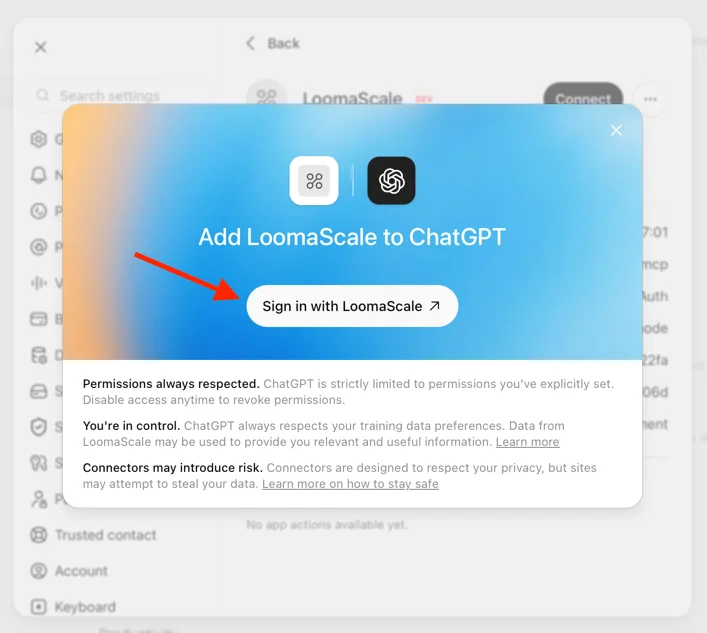
ChatGPT shows an “Add LoomaScale to ChatGPT” dialog — click Sign in with LoomaScale, sign in, and approve.
Check that it works
Open a new chat in ChatGPT, mention LoomaScale, and send:
If something goes wrong
It says your Meta Ads account is not connected
Connect it on the connections page and select an ad account. Reconnecting there is also the fix if the connection expired.
It says your free trial has ended
The free trial gives you unlimited requests for 14 days from your first task, and nothing resets after it. Open the connections page to pick a plan and keep working; every tool is available the moment it is active.
Reading works, but every change is refused
The plugin was authorized without write access. Uninstall LoomaScale in ChatGPT's plugin settings, install it again from step 1, and approve both ads.read ads.write permissions on the sign-in screen.
It asks which Facebook Page to use
Every ad has to run under a Page, and you have more than one. Ask show me the Pages I can advertise with, then name the Page in your request.
Opening the server URL in a browser shows an error
Expected. The address only answers the requests ChatGPT makes, so a browser visit returns “method not allowed”. That is not a sign anything is broken.
Still stuck? Email team@loomascale.com and include what you asked and what came back.
What should I ask ChatGPT first?
Three prompts for your first five minutes, in the order they make sense. Copy one, paste it into ChatGPT, send it.
All three only read the account. ChatGPT tells you what it would change; changing it is a separate request, and one that moves money is refused above your daily spend cap.
Where is my Meta Ads money being wasted?
Run this one first. It reads the last 30 days across campaigns, ad sets and ads, then ranks the three findings costing you the most: ad sets spending without results, creative whose frequency climbed while performance fell, and budget going to campaigns far above your usual cost per result. This is the free audit, so it works on the free trial and needs nothing beyond the connection you just made.
You get back: three findings ranked by money lost, the metrics behind each, the exact fix, and an estimate of what you would save per month.
@LoomaScale Audit my Meta Ads account for wasted spend over the last 30 days. Look across campaigns, ad sets and individual ads, and check three things in particular: ad sets that spend without producing results, ads whose frequency has climbed while performance fell, and budget going to campaigns delivering far above my usual cost per result. Report the three most important findings, ranked by how much money each one is losing me. For each finding show the supporting metrics, explain in one sentence why it matters, and give the exact change you recommend. Then estimate how much I could save per month by fixing all three, and tell me which single change is the safest one to make first. Do not change anything in my account without asking me first.
Which ad sets should I stop funding?
Ad sets that keep spending after they stopped producing results are the most common leak in a Meta account. This finds every ad set that spent more than $20 with no results in the last 30 days, shows what each one cost and how long it has been running, and tells you which to pause and which are still learning.
You get back: the ad sets to pause, with spend and age for each, and the ones to leave alone because it is too early to judge. Nothing is paused.
@LoomaScale Review my Meta Ads account over the last 30 days and find every ad set that spent more than $20 and produced no results. For each one show the spend, the campaign it sits in, how long it has been running and what its ads look like, then say whether the problem is the audience, the creative or the offer. Group them so I can see whether one campaign accounts for most of it. Recommend which to pause and which to fix, and ask me before you pause anything.
What changed in my account this week?
Make this the one you repeat. It compares the last 7 days with the 7 before at account level and for every campaign that moved, and names the cause — cost, conversion rate, delivery volume or creative that fatigued — so a jump in cost per result comes back with the ad set behind it rather than a dashboard to interpret.
You get back: the biggest moves in spend, results, cost per result, CPM, CTR and frequency, with the campaign or ad set responsible for each.
@LoomaScale Compare the last 7 days in my Meta Ads account with the 7 days before. Show spend, results, cost per result, CPM, CTR and frequency for both periods at account level, then for every campaign that moved. Name the campaigns and ad sets responsible for the biggest changes in each direction, and for each say whether the cause was cost, conversion rate, delivery volume or creative that fatigued. End with the single thing most worth my attention this week. Do not change anything.
Save any of these as a scheduled Task in ChatGPT and it runs on its own, at the cadence the prompt asks for.
Questions people ask before they start
Is LoomaScale free?
There is a free trial, and it starts with a free Meta Ads waste audit: 14 days of unlimited requests from your first task, no card required. You can connect a real ad account and run the whole workflow before paying for anything.
Do I need a paid ChatGPT plan?
No. The plugin works the same on free and paid ChatGPT accounts.
Can ChatGPT spend my budget without asking?
No. New campaigns, ad sets and ads can only be created paused — the tool schema has no field to ask for anything else. Every change that moves money is checked against the daily budget cap you set when you connect the ad account and refused above it, never quietly reduced. Inside that cap the assistant acts on what you tell it.
Does LoomaScale need my Facebook password?
Never. You authorize through Meta's own sign-in, the same way any approved marketing tool connects, and you can revoke that access from your Facebook account's Business Integrations settings at any time.
Is LoomaScale an official ChatGPT plugin?
Yes. LoomaScale is listed in ChatGPT's plugin directory, so you install it from the listing in one click instead of adding a server by hand. It connects over MCP and signs you in with OAuth — the standard ChatGPT uses for every plugin in the directory.
Do I need developer mode in ChatGPT?
No. That was only needed while LoomaScale was awaiting its listing in ChatGPT's plugin directory. The listing is live, so the plugin installs in one click and the connection runs through the standard OAuth sign-in.
Which Facebook Page do the ads run under?
Every Meta ad runs under a Page. If your ad account can advertise from more than one, ChatGPT asks which to use — or you name it in the request. Ask “show me the Pages I can advertise with” to see the list.
Does this work for Google Ads too?
Yes. The same plugin covers Google Ads: connect a Google Ads account inside LoomaScale and ChatGPT reaches both platforms from one chat. See the Google Ads setup guide.
Can I use Claude instead of ChatGPT?
Yes — LoomaScale is also listed in Claude's connector directory, and connecting it there is one click plus the same sign-in. See the Claude guide for Meta Ads.
Connect your Meta ad account to ChatGPT
Open LoomaScale in ChatGPT's plugin directory, sign in or create a free account, and run a free waste audit on your Facebook and Instagram campaigns. Every new account gets a 14-day free trial of unlimited requests and needs no card.
Connect Meta Ads to ChatGPTConnect your assistant to your ad platform
LoomaScale runs inside the assistant you already use. Pick the pair you work with; each guide takes about five minutes.

Manage Google Ads campaigns from ChatGPT: search terms, budgets and new campaigns, paused for your review. One-click install from ChatGPT's directory.
Read the integration
Manage Google Ads from Claude: audits, budget changes and new campaigns, every write inside the spend cap you set. Connect from Claude's directory.
Read the integration
Manage Facebook and Instagram campaigns from Claude: audits, budget caps and new ad sets, inside the limits you set.
Read the integration