
AI can optimize your Google Ads PPC by adjusting bids, identifying irrelevant search terms, reviewing budget allocation, and helping you test better ads. Google's built-in AI handles auction-level bidding, while a connected AI assistant can analyze your account and recommend changes. The goal is better business results, not simply cheaper clicks.
But "use AI" is not a complete optimization strategy.
Before changing anything, you need to know what you are improving: the cost of a qualified lead, revenue from purchases, customer acquisition cost, or another outcome that matters to your business.
That distinction should guide every recommendation. A campaign that generates inexpensive inquiries is not necessarily better than one that brings fewer, more valuable customers.
This guide covers seven Google Ads tasks, with account-level checks and prompts. For tool selection, client briefs, and team responsibilities, read AI PPC management for agencies. For attribution, outcome metrics, and tests spanning Google and Meta, use the AI ads optimization measurement guide.
Google Ads AI and an AI assistant do different jobs
There are two complementary ways to use AI for Google Ads optimization.
Google's built-in AI operates inside the advertising platform. Smart Bidding uses auction-time signals to optimize bids for conversions or conversion value. AI Max for Search adds features such as expanded search-term matching, text customization, and final URL expansion. These are different capabilities, not interchangeable names for the same feature.
An AI assistant helps you investigate and manage the account. Through a connector such as LoomaScale, ChatGPT or Claude can work with Google Ads reports, search terms, budgets, and supported campaign changes. This gives you a conversational way to review performance rather than relying only on dashboards. The setup guide covers what the connection can read and change.
Think of the division this way: let the advertising platform handle auction-level decisions, and use the assistant to help answer business-level questions.
Are we paying for the right searches? Are our conversion goals meaningful? What changed last month? Which problem deserves attention first?
7 ways AI can optimize your Google Ads PPC campaigns
1. Check whether your campaigns are optimizing for the right conversions
Start with what Google Ads considers a successful outcome.
Google distinguishes between primary and secondary conversion actions: primary actions are used for bidding under selected goals, secondary actions generally for observation. Custom goals are an important exception: actions included in them can be used for bidding regardless of their primary or secondary label.
For a lead-generation business, consider the difference between someone viewing a contact page, submitting an inquiry, becoming a qualified prospect, and signing a contract. Those events should not automatically be treated as equally valuable.
Ask an AI assistant to help you review your conversion definitions against your actual business objective. Provide the relevant settings or reports when they are not available through the connection.
Review the conversion actions and campaign goals I provide. My objective is qualified sales inquiries, not page visits. Identify any mismatch between what the campaigns optimize for and what my business values. Flag missing information rather than assuming the setup is correct.
The important boundary is data access. An assistant cannot determine whether a lead became a customer from click and form-submission data alone. Supply the relevant sales outcomes before asking it to judge lead quality.
2. Align bidding with your business objective
Google Ads offers different bidding strategies for different goals. Maximize Conversions and Target CPA focus on conversion outcomes; Maximize Conversion Value and Target ROAS focus on value. Choosing between them should follow your measurement setup and business objective.
Maximize Clicks, meanwhile, aims to generate clicks within your budget. It is not the same objective as maximizing purchases, qualified leads, or conversion value.
Use AI to review the fit between your current strategy and your goal, not to change bidding simply because another strategy sounds more advanced.
For example, a useful review might ask whether your purchase values are reliable enough for value-based bidding, whether your CPA target reflects actual economics, and whether the available data supports a meaningful test.
The assistant's job is to help evaluate the strategy. Google's bidding system still makes the auction-level bids.
3. Find irrelevant search terms and propose negative keywords
A keyword is what you target. A search term is what someone actually searched before your ad appeared. Google's search terms report helps you examine that difference and understand which searches generated activity.
Use an AI-assisted review to separate three situations:
- Clearly irrelevant searches suggest the wrong intent, such as job seekers clicking an ad for a service.
- Relevant but inefficient searches deserve investigation into the offer, ad, landing page, or bidding.
- Searches with insufficient evidence should not be labeled failures simply because they have a few clicks and no conversions.
Try this prompt:
Review my Google Ads search terms for the last 30 days. Separate clearly irrelevant queries from relevant queries with weak performance and queries with insufficient data. Show spend, clicks, and conversions. For each proposed negative keyword, explain the intent mismatch, recommend a match type and scope, and identify useful traffic it might block. Do not make changes.
This screenshot shows the search-term prompt above run in ChatGPT on our own Google Ads accounts. The visible excerpt shows the reporting window, currency, summary, and clearly irrelevant queries; the other requested groups are outside this crop. The summary reports ₴1,650.59 in spend, 6 clicks, and 0 conversions for the search terms returned by Google Ads, not necessarily all account traffic. Three irrelevant terms with spend are already marked excluded, so the review does not call for adding those exclusions again.
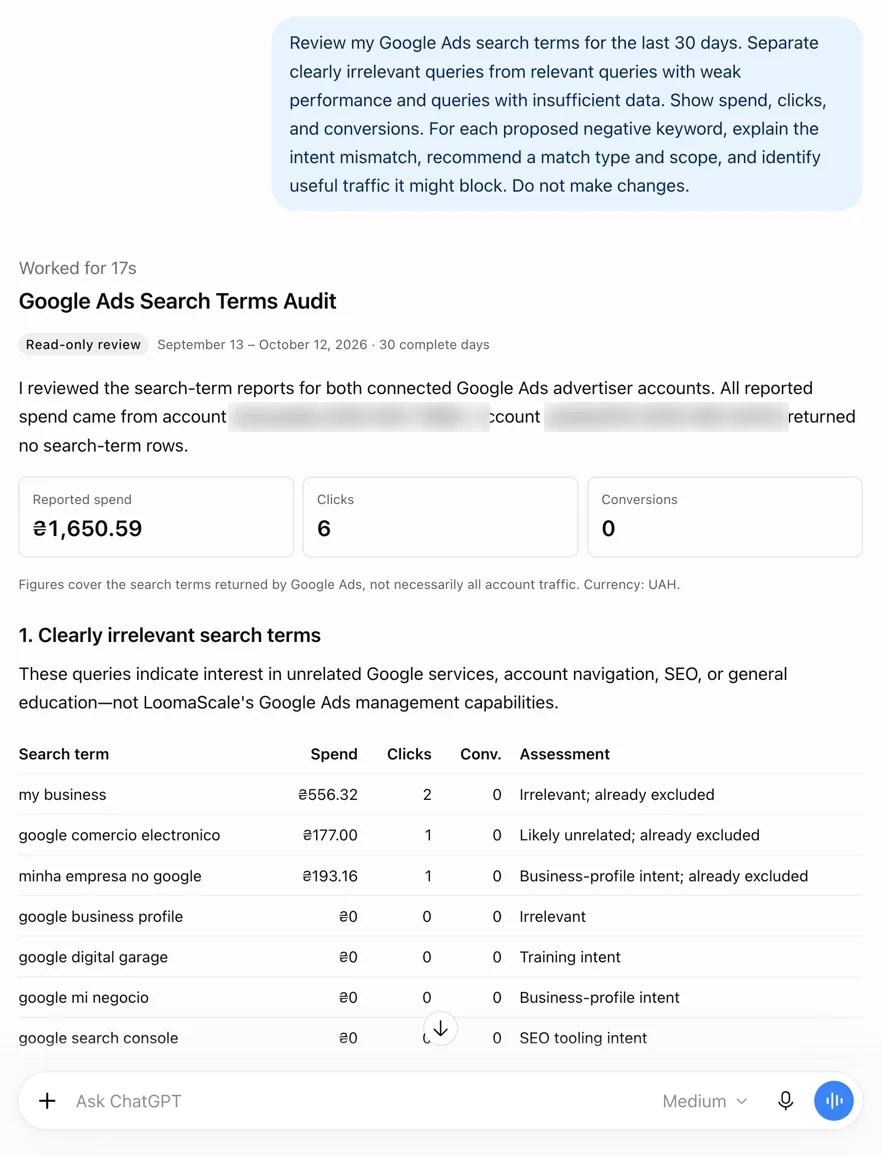
Review the proposed exclusions carefully. Negative keywords behave differently from positive keywords, and an overly broad exclusion can prevent useful searches from triggering your ads.
Also, do not treat the report as a complete record of every query. Google omits some low-volume search terms for privacy reasons. The wasted-spend search-terms guide and finding negative keywords with ChatGPT walk through this review in more depth.
4. Review budget pacing before moving money
LoomaScale supports account reviews covering spend, pacing, and results, which makes budget questions a practical starting point for an AI-assisted workflow.
Give the assistant your intended monthly spend and ask it to distinguish between two questions: whether you are on track to spend the budget, and whether that spend is producing acceptable results.
A campaign can be on budget and still perform poorly. It can also have a strong historical CPA without having enough additional demand to absorb a large budget increase efficiently.
Compare month-to-date spend with my planned monthly budget. Show which campaigns are ahead or behind pace, state the assumptions behind any projection, and identify where budget changes deserve investigation. Do not assume that the campaign with the lowest historical CPA can scale at the same CPA.
Remember that an average daily budget is not a strict daily spending ceiling. For most campaigns using average daily budgets, Google can spend up to twice that average on an individual day; the usual monthly limit is 30.4 times the average daily budget when it remains unchanged.
That makes a multi-day pacing review more useful than reacting to a single expensive day.
5. Improve the connection between search intent, ad copy, and landing pages
Google's responsive search ads test combinations of the headlines and descriptions you provide. The quality and variety of those inputs therefore matter, not just the fact that the ad format uses automation.
Use an assistant to develop distinct messages around your actual offer rather than producing fifteen slightly different versions of the same headline.
For a commercial cleaning company, possible angles might include recurring office cleaning, after-hours availability, or specialist services. Only use claims the business can genuinely deliver.
Then check the full journey: does the search suggest a particular need, does the ad address that need, and does the landing page make the next step clear?
Using the search terms, ad copy, and landing-page content I provide, identify mismatches between search intent and the offer. Draft three distinct messaging angles using only verified business facts. Explain the hypothesis behind each angle. Do not invent discounts, certifications, guarantees, or customer reviews.
Treat the output as material to test, not proof that the new copy will outperform the existing ad.
6. Diagnose performance changes instead of guessing at the cause
"CPA increased" describes a result. It does not explain what happened.
For a click-based report using consistent conversion definitions:
CPA = average CPC ÷ conversion rate
As a hypothetical example, a $4 average CPC with an 8% conversion rate produces a $50 CPA. If the conversion rate falls to 4% while CPC stays unchanged, CPA becomes $100.
The higher acquisition cost does not automatically mean you need cheaper clicks.
Use an AI-assisted review to break the change into its components: traffic cost, conversion rate, campaign mix, search intent, and any known changes to the offer or website.
Make the assistant distinguish observations from explanations. "Conversion rate fell" is an observation. "The new landing page caused it" is a hypothesis unless the evidence supports that conclusion.
Recent data also needs care. Conversions can arrive after the original click, making a recent period appear less efficient than an older period whose conversions have had more time to accumulate.
7. Turn recommendations into controlled tests
The most useful output is not a long list of possible changes. It is a clear next decision.
For every recommendation, request the supporting evidence, the proposed change, the expected benefit, the main downside, and the metric that will determine whether it worked.
Google's experiment guidance recommends a clear hypothesis, testing one variable at a time, and selecting success metrics before the test begins. That approach helps separate the effect of a change from other factors.
For example:
Hypothesis: a landing page focused on recurring office cleaning will generate more qualified inquiries than the general services page for office-cleaning searches.
That is more useful than "optimize the landing page." It names the audience, proposed change, and intended outcome.
Where practical and supported, use a campaign experiment rather than assuming a simple before-and-after comparison proves causation.
Example: what should an AI PPC review actually recommend?
Consider this hypothetical search-term report for a company that sells commercial cleaning services. It does not offer recruitment or business-startup training.
| Search term | Spend | Recorded leads | Initial interpretation |
|---|---|---|---|
| office cleaning jobs | $90 | 0 | Recruitment intent, not service-buying intent |
| how to start a cleaning business | $60 | 0 | Business-startup research, not service-buying intent |
| commercial cleaning quote | $250 | 5 | Relevant buying intent; recorded CPA is $50 |
| office cleaning near me | $40 | 0 | Relevant intent; insufficient evidence by itself |
A weak recommendation would be: "Block every search term with zero conversions."
A better recommendation separates relevance from performance.
The first two terms deserve review as negative-keyword candidates because their intent conflicts with the offer. The third generated leads, but you still need to know whether those leads were qualified. The fourth needs more context before exclusion: $40 of spend and no recorded leads does not, by itself, establish that relevant traffic is unprofitable.
The first two rows account for $150 in historical spend on apparently mismatched intent.
That is not a guaranteed $150 monthly saving. Future query volume could differ, and the campaign could spend the released budget elsewhere. The objective is to improve where the money goes, not manufacture a savings claim.
How to start optimizing Google Ads with AI
Start with one account, one clearly defined business objective, and a report-only review.
LoomaScale connects Google Ads to ChatGPT or Claude for account analysis and supported management tasks. It provides access to account information; it does not replace Google's auction-time bidding system.
Before the review, provide your target outcome, acceptable acquisition cost, budget, and any important business constraints. For an agency, identify the client account explicitly so the analysis stays within the intended scope.
Then use this prompt:
Review Google Ads account [account name or ID] for the last 28 complete days compared with the previous 28 complete days. My business goal is [goal], my target CPA or ROAS is [target], and my monthly budget is [budget]. Show spend, clicks, conversions, CPA, and conversion value or ROAS where available. State the reporting dates and currency. Rank the three most important optimization opportunities. Separate confirmed observations from hypotheses, identify missing data, and account for conversion delays where the information is available. For each opportunity, show the evidence, recommended next step, and potential downside. Do not make any changes.
Review the evidence before moving to implementation.
For any proposed edit, ask for the exact campaign or ad group, the current setting, and the new setting. Check the integration's supported actions and your permission settings rather than assuming every write action will always trigger a separate confirmation. ChatGPT's app approval behavior depends on the app, account, and applicable settings.
Start with a better decision, not more automation
The strongest reason to use AI for PPC is not that it can produce more recommendations. It is that you can demand a clear connection between the problem, the evidence, and the next action.
Start by checking what counts as a conversion. Then review search intent, bidding, budgets, and messaging against that objective. Test meaningful changes and evaluate them with enough data.
Connect Google Ads to LoomaScale and run your first account review in ChatGPT or Claude. Start with analysis, understand the recommendation, and decide what should change.


